
WorkBox
Portable Workstation For Hybrid Workers
This project aims to create a solution for hybrid workers adjusting to the dynamic hot-desking environment. Although designed with specific workers in mind, this product can serve anyone needing a portable workstation, whether at home, in the office, or in a café. Its portability enables users to establish their desk setup anywhere, anytime.
Project Type
Product Design / Office Tool
Team
Individual Project (BID Thesis)
Evolution of workspace and its problem.
Hot desking, a flexible workspace arrangement where employees do not have assigned desks, aims to maximize space and resources in the post-pandemic hybrid office setup. However, this approach often leads to significant challenges for employees, especially since their roles vary widely—from hands-on tasks requiring specific tools and setups to digital work that demands a certain technological workspace. Without a fixed desk, employees struggle to find a spot and adjust it daily to their specific needs, reducing comfort and productivity. This constant need to adapt to different workstations increases stress levels, directly impacting overall job satisfaction and focus.

Post-Pandemic Office and Employee Behavior Changes
67
%
felt anxious about finding a spot to sit each day (HotDeskPlus).
44
%
expressed frustration over the time taken to set up a computer once they finally secured a desk (HotDeskPlus).

Long Average Hot desking Setup
A UK survey of over 1,000 workers found that hot-desking employees spend about 18 minutes daily searching for a workspace, with nearly a quarter taking up to 30 minutes (HotDeskPlus).

Reduced Privacy Increase Exhaustion
Employees with less private space and personal items on their desk reported higher emotional exhaustion, indicating reduced workspace privacy affects well-being (Laurence, Fried, & Slowik, 2013).

Design Goals
Portable and Mobile
Design solutions should be lightweight, compact, and easy to transport, enabling employees to move seamlessly between workstations. The system should fit within a standard locker for convenient storage, supporting an agile, hybrid work environment.
Streamlined Desk Setup
The design should simplify the process of setting up workstations by allowing employees to carry all their essential tools, including laptops, monitors, and personal items, in one go. A quick, intuitive setup ensures reduced stress and maximized productivity.
Built-in Privacy & Focus
To reduce distractions in open, dynamic workspaces, the design should incorporate elements such as dividers or partitions. These features provide personal boundaries, enhance concentration, and create a sense of comfort even in shared environments.
Observational Study and Insights
I conducted observational research on 17 participants, aged 20s to 30s, who are currently employed or have work experience in a corporate setting. They illustrated their work desk setups at home, work, or a café. While setups varied widely, common patterns included placing personal items (stationery, planners, etc) opposite their dominant hand, using dual monitors, and positioning keyboards close to them with outlets further back.

User Testing and Fabrication
With the consideration of users' steps of desk set-up and work behaviors, rapid prototypes were developed to identify the best organization and intuitive design. I validated and tested prototypes through user testing, capturing top-down views of how users interact with them.
The final prototype was built using chipboard, plexiglass, PLA 3D-printed parts, a printed circuit board (PCB), hardware, and fabric.


Final Design
WorkBox comprises two components: a portable monitor power hub and a storage box.


Adjustable Dual Monitor Setup
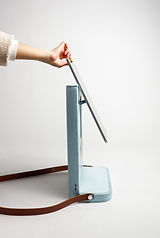
The power hub features an adjustable dual monitor that can be raised to eye level or laid flat against a wall with a four USB-C port setup for dual-monitor connection.


Living Hinge Laptop Riser
The storage box is designed to be placed next to the portable monitor. Its door, which opens with a living hinge, doubles as a laptop riser.
Storage Box Layout
The front-facing storage space allows for easy and quick setup, promoting efficient workspace management. Items that are not immediately needed can be kept out of sight behind the laptop, helping maintain a tidy environment.


Wireless Charging Station
The hub includes a wireless charging station capable of charging two devices simultaneously.
Production & CMF

WorkBox would incorporate aluminum and steel for the monitor adjustment mechanism, PETG for the base and flat surfaces, and a mix of chipboard, EVA foam, and fabrics like wool, cotton blends, microfiber suede lining, and leather straps. These materials create a cozy, yet professional look, enhanced by bold brown leather. The color palette aims for a welcoming and lightweight feel, embodying a piece of furniture in a workspace.


The CMF draws inspiration from Bang & Olufsen speakers and Sony headphone cases, featuring contrasting textures of hard and soft materials. If produced, Workbox would offer a variety of customizable color combinations. The semi-gloss finishes and textured fabrics move away from high-tech aesthetics, embracing a warm, friendly image that complements any workspace or home environment.